@about/
Bitwise consists of several applications running in different environments. The reason is, for me, to be able to run C/C++ applications through a web server. The first application I developed was the "Login Manager". It aims to be a fast and secure application that handle user login credentials.
The initial idea was to run all the web services on my local server. However, my ISP (Internet Service Provider) have blocked port 80 (the http-standard port). And my external web service provider did not offer any custom ports to be used in a redirect. But, I could deplay a Python application at my external web service provider. So, the current infrastructure is a workaround for me to solve the challange of having a site that can run C/C++ applications.
Bitwise infrastructure
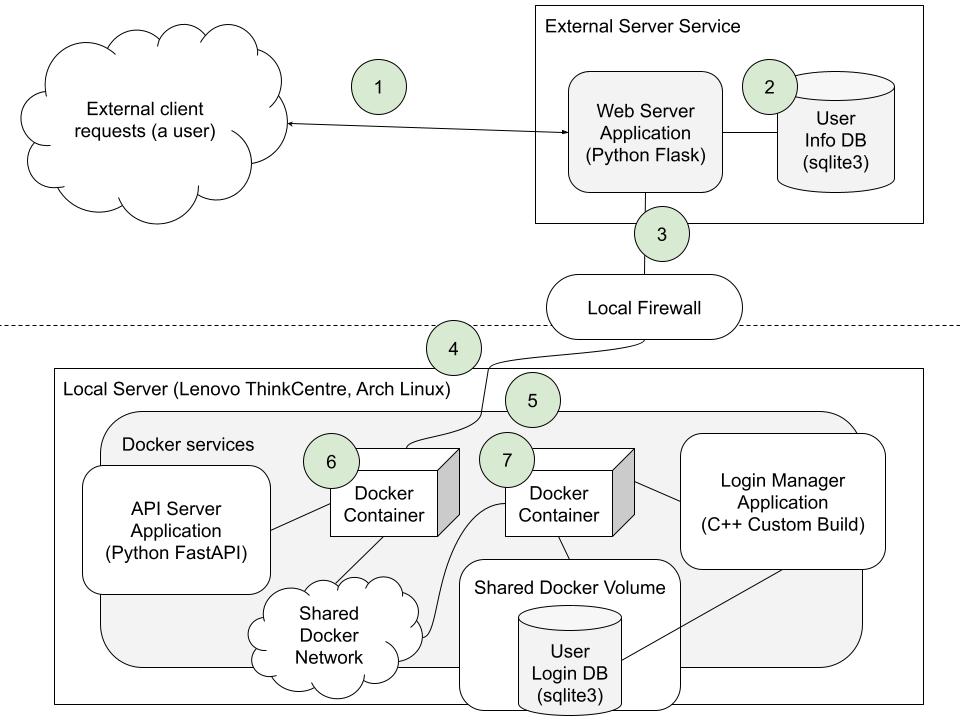
Getting into the flow
The communication network of Bitwise is a potential security risk. Since Login Manager was developed to maintain a high level of security, the communication through Bitwise would need to keep up with that ambition. This resulted in the following flow:
- HTTPS, a secure external communication between the client and web server.
- User information stored locally for fast retrieval after a user session has been established.
- A TCP connection to the location of the local server. The path leads through a firewall that lets through this connection.
- The local server is accepting the TCP connection at the specified port.
- The local server is using container technology through docker CLI. This gives another layer of security, keeping each application isoloated.
- An API-application, running inside a container, accepts the TCP connection originated from the outside network. This application has its own public-private key infrastructure that enables encrypted connection from the external web server.
- Through a shared docker network, the API can send login-requests to the Login Manager. This enables the Login Manager to run in a seperate container. To enable a low latency, this communication uses udp instead of tcp. Also, a docker volume is mounted to the container to keep the login database intact when/if the container needs to managed. When a result is computed in Login Manager, it is sent back the same way, through the API to the external web server. The web server runs its logic and presents the response back to the user.